
Last Updated on October 12, 2026
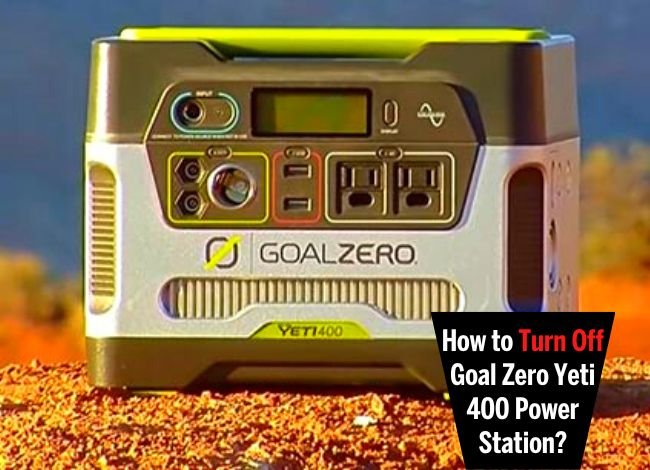 The Goal Zero Yeti 400 is a useful portable power station for camping, outdoor activities, and short power outages. It can charge smartphones, laptops, and other small electrical devices without requiring gasoline or producing engine exhaust.
However, if you are using the Yeti 400 for the first time, you may wonder how to operate its power buttons. Unlike some newer power stations, the original Yeti 400 has separate controls for its AC, USB, and 12V outputs.
So, how do you turn off Goal Zero Yeti 400? The process is simple. You need to switch off the output ports you were using and disconnect your appliances. Let’s discuss how to turn the power station on and off, recharge its battery, and solve some common operating problems.
How to Turn Off Goal Zero Yeti 400
To turn off the Goal Zero Yeti 400, press the power button above the output section you are using. When the green indicator light goes out, that output section is switched off.
The original Yeti 400 has separate power buttons for its AC outlets, USB ports, and 12V outputs. Turning off one section does not necessarily turn off the others.
Follow these steps after using your power station:
- Turn off your appliance: Switch off the laptop, television, light, or other device connected to the Yeti.
- Disconnect the appliance: Carefully unplug the device from the AC, USB, or 12V output.
- Press the output power button: Press the button above the corresponding output section.
- Check the indicator: The green LED should turn off, confirming that the output is disabled.
- Check the other outputs: If you were using multiple output sections, switch off each one separately.
You do not need to unplug the battery or open the power station to stop supplying electricity to your appliances.
Remember that the original Yeti 400 does not operate exactly like newer Goal Zero models with a master power switch. Its output buttons control which ports are active.
Why Should You Turn Off the AC Output After Use?
The AC inverter converts battery power into electricity suitable for compatible household appliances. This conversion uses some energy even when no appliance is drawing a significant load.
If you leave the AC section enabled unnecessarily, the inverter may continue consuming battery power.
Goal Zero specifically recommends turning off the AC output when it is not being used. This simple habit helps conserve battery energy for your next use.
How to Turn On a Goal Zero Yeti 400
Turning on the Goal Zero Yeti 400 is just as easy. First, make sure its battery has enough charge. Then select the appropriate output for the device you want to power.
For example, if you want to operate a laptop using its AC charger, press the AC power button above the AC outlets. The green indicator should illuminate when the output is enabled.
After that, connect the laptop charger to the AC outlet and use your device normally.
For a smartphone or another USB-powered device, enable the USB section instead. The 12V section is intended for compatible 12V equipment.
You can enable more than one output section when needed, but the combined electrical demand must remain within the power station’s specifications.
Understanding the Goal Zero Yeti 400 Power Buttons
| Button | Function |
|---|---|
| AC Power | Enables or disables the AC inverter outlets |
| USB Power | Enables or disables the USB charging ports |
| 12V Power | Enables or disables the 12V outputs |
| Display Control | Shows battery and electrical information and changes supported display readings |
The LCD battery display shows the approximate remaining charge. It also provides information about electrical input and output, depending on the selected display setting.
If the Yeti starts beeping because of a low battery, recharge it promptly.
How to Charge a Goal Zero Yeti 400
The original Goal Zero Yeti 400 supports three main charging methods: a compatible AC wall charger, solar panels, and a vehicle charging adapter.
Charging time depends on the source and available input power. The original Yeti 400 has a 396Wh AGM lead-acid battery and an input port rated for 14–29V, up to 10A and 120W.
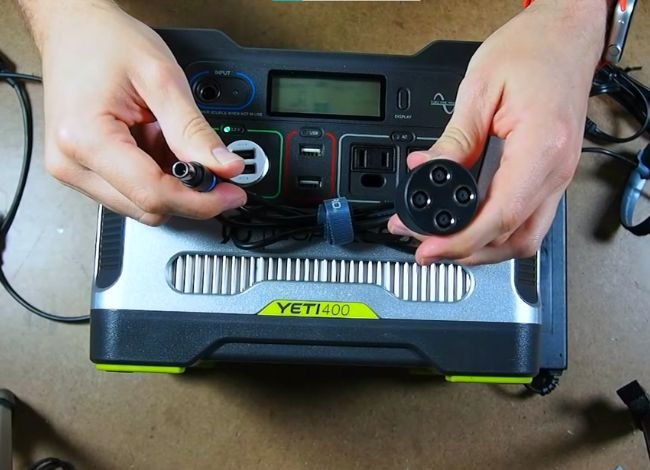
1. Charging With a Wall Outlet
Wall charging is one of the easiest options when you are at home.
Connect the compatible Goal Zero wall charger to the charging input on the front of the Yeti 400. Then plug the charger into a suitable household electrical outlet.
The charging indicator should illuminate, and the battery display should show charging activity.
Goal Zero lists approximately five hours to recharge the original Yeti 400 using its compatible wall charger under specified conditions.
Actual charging time may vary with battery condition, temperature, and connected loads.
2. Charging With Solar Panels
A compatible solar panel is another convenient charging option, especially when camping or staying away from electrical outlets.
First, place the solar panel where it receives direct sunlight. Then connect it to the Yeti 400’s charging input using the correct cable and connector.
Check the display to confirm that the power station is receiving input power.
For example, Goal Zero lists approximately 6–12 hours of solar charging with a compatible Boulder 100 panel under suitable conditions.
However, solar charging can take longer during cloudy weather or when the panel is partially shaded.
Always verify solar panel compatibility before connecting it. Do not exceed the Yeti’s specified input voltage or current limits.
3. Charging From a Car Outlet
You can also recharge the original Yeti 400 from a vehicle using a compatible Goal Zero car charging cable.
Connect the adapter to the vehicle’s suitable accessory outlet and the charging input on the power station.
Goal Zero lists approximately 13 hours using its 30W car charging setup.
Follow the instructions for your vehicle and charging adapter. Avoid draining your vehicle’s starting battery by charging for long periods when the engine is not running.
How Do You Know When the Goal Zero Yeti 400 Is Fully Charged?
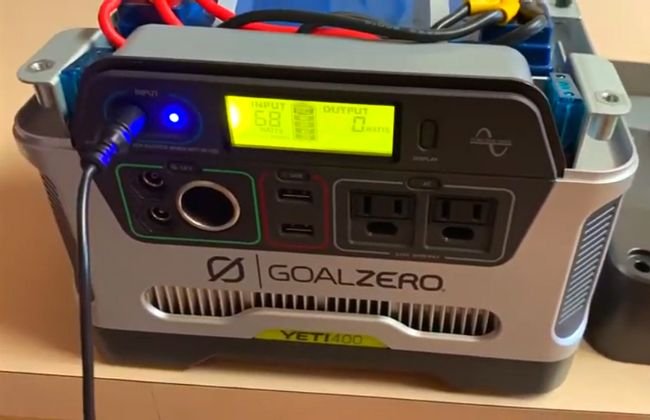
The Yeti 400 includes an LCD battery display with five battery segments.
During charging, the battery segments can blink to show charging progress. When the battery is fully charged, the segments stop blinking and remain solid according to the manufacturer’s user guide.
The display also helps you monitor the remaining energy during use. If the battery level becomes low or the unit starts beeping, connect it to a suitable charging source as soon as possible.
Why Won’t My Goal Zero Yeti 400 Turn On?
Sometimes the Yeti 400 may not supply electricity when you press an output button. This does not always mean the power station is permanently damaged.
There are several possible reasons.
1. Battery Is Discharged
A low or discharged battery may prevent the power station from supplying electricity.
Solution: Connect the original Yeti 400 to a compatible charger and check whether the charging indicator and battery display respond.
2. Output Section Is Turned Off
If the AC, USB, or 12V section is disabled, connected devices will not receive power.
Solution: Press the corresponding output button and check whether its green indicator illuminates.
3. Connected Appliance Uses Too Much Power
The original Yeti 400 provides 300W continuous AC power with a maximum 600W surge rating. Appliances that exceed these limits may trigger an inverter fault or fail to operate.
Solution: Disconnect the appliance, check its running and starting wattage, and follow Goal Zero’s troubleshooting instructions before restarting the output.
4. Battery or Inverter Warning
The Yeti 400 display can show warnings related to battery failure, temperature, or inverter problems.
Solution: Read the warning displayed on the screen and consult the user manual. If you see a persistent BATTERY FAIL or INVERTER FAIL warning, contact Goal Zero support rather than opening the power station yourself.
How to Maintain the Goal Zero Yeti 400 Battery
The original Yeti 400 uses a sealed AGM lead-acid battery, which requires different storage care from the lithium batteries used in many newer power stations.
Goal Zero recommends keeping the original Yeti connected to an appropriate charging source when possible or recharging it periodically during storage. Its documentation recommends checking and recharging the battery at least every three months.
Do not leave the battery deeply discharged for a long time. Lead-acid batteries can lose capacity and suffer permanent damage when stored without sufficient charge.
Keep the Yeti in a clean, dry, temperature-controlled location. Avoid blocked ventilation, excessive heat, and freezing conditions outside its permitted operating or storage range.
If you are considering a larger Goal Zero model with lithium battery technology, our Goal Zero Yeti 1000 review discusses another power station with different capacity and battery specifications.
Goal Zero Yeti 400 vs. Yeti 400 Lithium
The original Yeti 400 and Yeti 400 Lithium have similar names, but they do not use the same battery technology.
| Specification | Original Yeti 400 | Yeti 400 Lithium |
|---|---|---|
| Battery Type | AGM lead-acid | Lithium-ion NMC |
| Battery Capacity | 396Wh | 428Wh |
| Weight | 29 lb | 16.3 lb |
| Continuous AC Output | 300W | 300W |
| Typical Wall Charging | About 5 hours | About 7 hours with specified charger |
These are manufacturer-published specifications for the respective models. The charging accessories, maintenance requirements, and output controls should always be confirmed using the correct user guide.
Frequently Asked Questions
1. How do you turn off Goal Zero Yeti 400 completely?
Switch off the AC, USB, and 12V output sections using their respective power buttons, then disconnect your appliances. The original Yeti 400 uses separate output controls rather than the same master power-switch arrangement found on some newer power stations.
2. Does the Goal Zero Yeti 400 turn off automatically?
The original Yeti 400 includes battery and inverter protection features, but you should not rely on an automatic shutdown to conserve energy. Turn off unused output sections manually.
3. Can you leave a Goal Zero Yeti 400 plugged in?
Goal Zero recommends keeping the original lead-acid Yeti 400 connected to a compatible charging source when practical to help maintain its battery. Always follow the charging and storage instructions for your exact model.
4. How long does a Goal Zero Yeti 400 battery last?
Runtime depends on the appliance’s wattage and the battery’s condition. The original Yeti 400 has a nominal capacity of 396Wh, but actual usable AC energy is lower because of inverter losses and battery characteristics. Larger appliances also drain the battery more quickly.
5. Can the Goal Zero Yeti 400 run a refrigerator?
It may run a small, efficient refrigerator if both its running power and compressor starting surge fall within the Yeti 400’s output limits. Many full-size refrigerators require more starting power, so check the refrigerator’s electrical specifications before connecting it.
6. What should I do if my Goal Zero Yeti 400 is not charging?
Check the charging cable, outlet, input port, and battery display. Make sure the charger is compatible with your model. If the unit still does not charge or shows a battery failure warning, contact Goal Zero support for further assistance.
Final Thoughts
Learning how to turn off Goal Zero Yeti 400 is simple once you understand its output controls. The important thing is to switch off the AC, USB, and 12V sections when they are no longer needed.
You can recharge the original Yeti 400 with a compatible wall charger, solar panel, or car charger. Regular charging is especially important because its AGM lead-acid battery should not be left deeply discharged during storage.
Finally, follow the manufacturer’s instructions and check the battery display whenever you use the power station. With proper care, the Goal Zero Yeti 400 can remain a convenient backup power source for small electronic devices.