
Last Updated on October 12, 2026
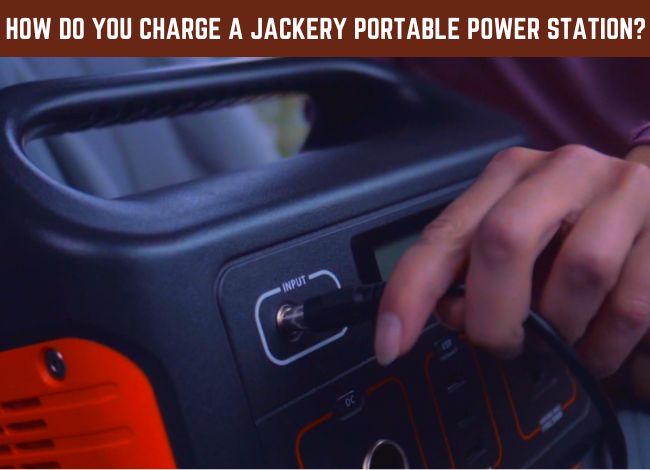 Jackery portable power stations are popular for camping, RV trips, outdoor activities, and emergency backup power. Depending on the model, they can charge smartphones and laptops or run appliances such as televisions, mini refrigerators, coffee makers, and other electrical devices.
But before using one, you should know how to charge a Jackery portable power station correctly. Charging is generally simple, and most Explorer models offer several options depending on where you are.
You can recharge many Jackery power stations through a household wall outlet, compatible solar panels, or a vehicle’s 12V power socket. The charging time depends on the model, battery capacity, and available input power.
Let’s discuss these methods and some useful tips for getting the best performance from your Jackery.
How to Charge a Jackery Portable Power Station
There are three main ways to charge a Jackery portable power station. Some models also support USB-C input charging or additional charging arrangements, but not every Explorer has those features.
Before connecting any charger, check the model number and use the correct cable or adapter. Older Jackery Explorer units may have different input connectors and charging limits than newer models.
1. Charging With a Wall Outlet
Charging from a wall outlet is usually the easiest option when you are at home or staying somewhere with electricity.
First, place the power station on a stable, dry surface with enough space around its ventilation openings. Then connect the compatible Jackery charging cable or AC adapter to the designated input port.
Plug the other end into a suitable household outlet. The display should indicate that the power station is receiving electricity.
You can monitor the battery percentage and input wattage on models equipped with those display features.
Some newer Explorer models support much faster AC charging than older versions. For example, Jackery lists approximately 1.7 hours of normal AC charging for the Explorer 1000 v2, depending on the specified charging configuration.
Remember that the charging accessories and input connections vary. Always use the instructions provided with your particular model rather than assuming every Jackery charges the same way.
2. Charging With Solar Panels
Solar charging is another useful option, especially when camping or staying in an area without reliable electricity.
Many Jackery Explorer models support solar charging, including older smaller units and newer high-capacity models. However, you must use compatible solar panels, cables, and connectors.
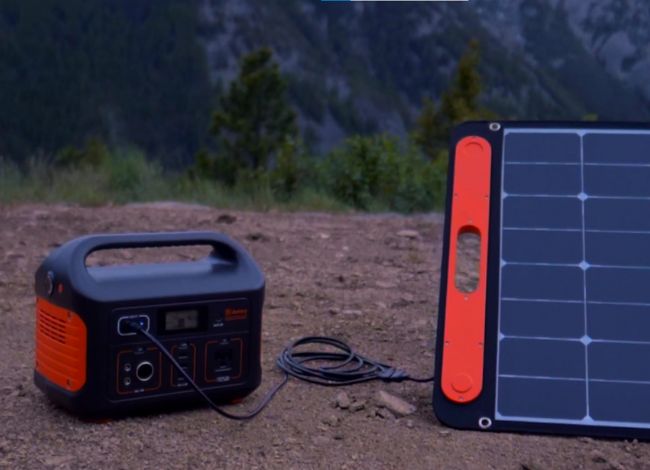
Jackery offers SolarSaga panels for different power stations. To charge your unit, connect the compatible panel to the correct solar input, unfold the panel, and position it where it receives direct sunlight.
Solar charging speed depends on sunlight intensity, panel wattage, temperature, shading, and the power station’s maximum input capacity.
For example, Jackery estimates approximately 7.5 hours to recharge its Explorer 1000 v2 with one compatible SolarSaga 200W panel under specified conditions. Using two compatible 200W panels can reduce the estimated time to around 3.8 hours.
Actual charging may take longer if clouds pass overhead, the panels are partially shaded, or sunlight is weak.
Do not connect arbitrary solar panels without checking their voltage, current, connector requirements, and compatibility with the power station.
If you are comparing models for camping, our Jackery portable power station review discusses several Explorer options and their features.
3. Charging Through a Car Outlet
A vehicle’s 12V outlet is another convenient way to recharge many Jackery power stations while traveling.
For this method, use the car charging cable recommended for your Jackery model. Connect it to the power station’s designated input port and the vehicle’s compatible 12V accessory socket.
Follow Jackery’s instructions about whether the vehicle engine should be running during charging. Avoid leaving the power station connected for extended periods while the engine is off, as this may drain the vehicle’s starting battery.
Car charging is generally slower than wall charging on larger models. For example, Jackery lists approximately 12 hours for charging the Explorer 1000 v2 using a compatible car charging connection.
This method is particularly helpful for road trips, but it may not be the fastest option when you need a full charge.
What Is the Fastest Way to Charge a Jackery Power Station?
For many modern Jackery models, AC wall charging is one of the fastest and most convenient options. However, the fastest method depends on the model and its supported charging modes.
Some newer Explorer power stations offer fast or emergency charging features. Jackery’s Explorer 1000 v2, for example, supports a special emergency charging mode that can recharge the battery considerably faster than its normal AC charging mode.
USB-C is not always the fastest option. In fact, many Jackery USB-C ports are designed mainly for charging external devices rather than recharging the power station itself.
Certain models support USB-C input, but you must check the specifications to confirm the permitted direction and maximum wattage.
For most users, the simplest approach is to use the manufacturer’s recommended AC charging equipment and normal charging mode.
How Long Does It Take to Charge a Jackery Portable Power Station?
There is no universal charging time for every Jackery Explorer. Smaller batteries generally require less energy to recharge, but the charger’s input power also makes a major difference.
For example, the Explorer 1000 v2 has a battery capacity of approximately 1,070Wh and supports relatively fast AC charging. Older Explorer models may charge more slowly because their charging input is limited.
| Charging Method | Explorer 1000 v2 Example |
|---|---|
| Normal AC wall charging | Approximately 1.7 hours |
| One SolarSaga 200W panel | Approximately 7.5 hours |
| Two SolarSaga 200W panels | Approximately 3.8 hours |
| Compatible 12V car charger | Approximately 12 hours |
These are Jackery’s approximate specifications for the Explorer 1000 v2 under stated conditions, not charging times for every model. Solar conditions and charging configurations can affect actual results.
If you are using an Explorer 240, 300, 500, 1000 Plus, or another model, consult its own charging specifications.
Which Devices Can a Jackery Portable Power Station Run?
Jackery portable power stations can operate many everyday electronic devices. However, the appliances you can use depend on the power station’s battery capacity and maximum output rating.
Smaller models are suitable for charging phones, tablets, laptops, cameras, and powering small LED lights.
Larger models may support televisions, mini refrigerators, coffee makers, and certain other household appliances, provided their running and starting power requirements stay within the station’s limits.
High-power appliances such as electric grills, kettles, and heaters can drain the battery quickly. Some smaller Jackery models cannot run these appliances at all.
Before connecting an appliance, check its wattage and compare it with the Jackery’s rated AC output and surge capability.
How to Calculate Jackery Power Station Runtime
You can estimate how long a Jackery will run an appliance by checking the station’s battery capacity in watt-hours (Wh) and the appliance’s power consumption in watts (W).
Estimated runtime = Battery capacity (Wh) × Efficiency factor ÷ Appliance power (W)
For a simple AC-powered example, using an 85% efficiency assumption can provide a rough planning estimate. Actual efficiency depends on the model, load, and operating conditions.
Suppose you have a 1,070Wh Jackery and a television that uses 80 watts:
1,070 × 0.85 ÷ 80 = approximately 11.4 hours.
This is only an estimate. Actual runtime may be shorter because of inverter losses, temperature, battery condition, and other connected devices.
For refrigerators, the calculation becomes more complicated because compressors cycle on and off and require additional startup power.
If you want to compare different battery-powered backup options, see our portable power station comparison guide for additional models and capacity information.
How Long Does a Jackery Portable Power Station Last?
The lifespan of a Jackery power station depends on its battery chemistry, usage, and storage conditions.
Some older Jackery Explorer models use lithium-ion battery technology with lower rated cycle-life figures than newer models.
For example, Jackery’s Explorer 1000 v2 uses a lithium iron phosphate (LiFePO4) battery rated for approximately 4,000 charge cycles while retaining at least 70% of its original capacity under the specified test conditions.
This does not mean the station stops working immediately after 4,000 cycles. Instead, it describes a capacity-retention benchmark.
A charge cycle refers to using energy equivalent to the battery’s full capacity. Several smaller partial discharges can add up to one equivalent full cycle.
Proper storage and charging habits can help preserve battery capacity over time.
How to Keep Your Jackery Battery in Good Condition
Taking care of a Jackery power station is not difficult. A few simple habits can help you avoid common battery and charging problems.
- Use compatible charging accessories: Follow the manufacturer’s cable, adapter, and solar panel specifications.
- Avoid extreme heat: Do not leave the unit inside a hot vehicle or in direct sunlight for long periods.
- Keep it dry: Protect the power station and electrical connectors from rain, splashes, and excessive moisture.
- Check the charging temperature: Lithium batteries may restrict charging in extremely cold or hot conditions.
- Keep ventilation openings clear: Allow enough airflow around the unit, especially while charging or supplying high loads.
- Follow storage instructions: Recharge and maintain the battery according to your specific model’s manual if you will not use it for a long period.
- Inspect cables regularly: Stop using damaged, loose, or overheating connectors.
Avoid opening the power station or attempting to repair its battery pack yourself. Internal batteries and power electronics can be hazardous even when the device is switched off.
Why Is My Jackery Portable Power Station Not Charging?
Sometimes a Jackery does not start charging immediately. This can happen for several reasons, and it does not always mean the battery is defective.
1. Incorrect Charger or Connection
Check that you are using the correct input port and compatible charging cable. A cable designed for a different Explorer model may not work properly.
2. Battery Temperature Is Outside the Charging Range
If the power station is too hot or cold, its battery management system may temporarily restrict charging.
Move the unit to a safe location within the manufacturer’s recommended charging temperature range and allow its temperature to stabilize.
3. Solar Panels Are Not Producing Enough Power
Cloud cover, shade, poor panel positioning, and incompatible connectors may prevent effective solar charging.
Check the display for solar input wattage and reposition the compatible panels as needed.
4. Car Outlet Is Not Supplying Power
Some vehicles disable their accessory outlets when the ignition is switched off. A blown outlet fuse or unsuitable charging adapter may also prevent charging.
Check the vehicle’s manual and the Jackery charging requirements before trying again.
If the power station still will not charge, follow the troubleshooting instructions in its manual or contact Jackery support. Do not bypass battery protections or use an improvised charging connection.
Frequently Asked Questions
How long can a Jackery portable power station run a fridge?
Runtime depends on battery capacity and the refrigerator’s actual energy consumption. A small refrigerator may operate for several hours or longer on a sufficiently sized Jackery, but compressor cycling and startup power make exact estimates difficult. Check the appliance specifications before connecting it.
Can a Jackery portable power station run a television?
Yes, many Jackery Explorer models can power televisions within their output limits. For example, a 240Wh model running an 80W television might provide roughly 2.5 hours under an assumed 85% efficiency. Actual runtime will vary.
Can you charge a Jackery while using it?
Many Jackery models support pass-through charging, which allows the power station to receive electricity while supplying power to connected devices. However, supported modes and limitations vary, so check your model’s instructions before using this feature.
Can you charge a Jackery portable power station with USB-C?
Some Jackery models support USB-C input charging, while others provide USB-C only for charging external devices. Check your unit’s specifications to determine whether its USB-C port accepts charging input.
Is a Jackery portable power station worth the money?
A Jackery can be worthwhile if you need quiet, portable battery power for camping, electronics, or short power outages. Consider its battery capacity, maximum output, charging speed, and price before buying. It is not a replacement for a large whole-house backup system.
Can I connect a Jackery directly to my home’s electrical panel?
Do not connect a Jackery directly to household wiring or backfeed electricity through a wall outlet. Home-circuit backup requires compatible equipment and a professionally installed, code-compliant transfer arrangement. Check whether your specific Jackery model is approved for that application.
Final Thoughts
Learning how to charge a Jackery portable power station is simple once you understand the available charging methods. Most Explorer models can recharge through an AC wall outlet, compatible solar panels, or a suitable 12V car charging connection.
Wall charging is usually the most convenient choice at home, while solar and car charging are helpful during camping or road trips.
The correct charging method and charging time depend on your particular Jackery model. Always use compatible accessories, follow the temperature limits, and keep the battery properly maintained.
With the right charging habits, your Jackery can provide convenient backup electricity for many everyday activities and unexpected outages.